
 This is an updated post from January 2012. I wanted to share it again, because after using Evernote to organize recipes for the last few months, I’ve learned a few new tricks! Plus I think my new friends from the William Morris Project could really benefit from this as well. 😉
Back in January, my husband and I started reading David Allen’s book Getting Things Done: The Art of Stress-Free Productivity. It started to really click in our brains and lives…especially when Stefan started implementing what he’s read so far. You see, I got the book and started reading, then I got caught up with other junk…and now he’s encouraging me to get back on the bandwagon.
But before this turns into a massive long story about decluttering (which in a way it still is), I’ll just hold off on the next group of decluttering progresses for another day. And instead, I’ll get to the point of why I so love Evernote to organize recipes. If you’ve been reading me for a while, you know I think Evernote totally rocks.
I started using this free note-taking software (although there is a paid upgrade) about 6 months ago and it has really revolutionized the way I take notes and keep up with paper clutter. Little by little, I have been going through all of my old handwritten notes about future projects, tasks, ideas and so on, and putting them into Evernote. The next major thing to tackle will be our important documents. The great thing is that all of your information can be synced across multiple platforms (PC/Mac, online, iPhone, iPad, Blackberry, Android, etc) or you can just use the software offline.
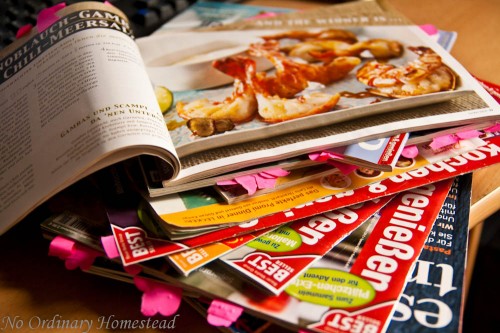
Now remember the bookshelf full of magazines I posted about in my decluttering in 2011 roundup? Well, I knew that the process of going through those magazines was going to be daunting. And I also know that my willingness to try new things is not quite as great as Stefan’s — so I decided to get him to start marking the recipes he found interesting on Sunday, just when he had a few minutes and wasn’t really doing anything else. As you can see, we made some steady progress on tagging what needs to be scanned. And I currently have a stack of magazines under my desk which is about 1 foot high that need to be scanned. Thankfully all of this hard work has already begun to pay off, and we’ve tried several new recipes already — of which have been really yummy!
How to Organize Recipes with Evernote
My MIL had the smart idea to start scanning her recipes last year so she can have her favorites with her whether she’s at home in Germany or America. She was just keeping them on her laptop, until I told her about Evernote. And Evernote keeps everything in the cloud, so you can view it on your computer, Mac, smart phone or iPad.
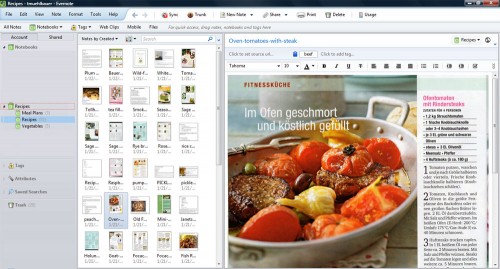
The beauty of Evernote is that you can make the filing system complex or simple. But really, you don’t need to go overboard with putting things in folders and so on. I just set a few essential tags (like breakfast, dinner, beef and so on) and let the built in search features of Evernote do the rest of the work.
Because Evernote can search images and PDF files for words you search for, you really only need to list those tags which are not already in the recipe itself — or in my case a translation since I have a lot of recipes in German but can’t image typing in “Hähnchen” instead of “chicken” when I’m looking for dinner inspiration.
I not only have the magazines full of recipes, but also recipes in binders which are printed from the internet or elsewhere. So I usually look to see if these recipes still exist somewhere online and copy them in that was (using Clearly with the Web Clipper for your browser is a great way to do this.) It also makes it easier to add notes or make edits to the recipes after we’ve made them so we can improve on them next time around.
But the one thing you might want to include are tags for your personal ratings, holiday or meal type indications, or things like whether it’s a freezer-friendly meal or can be cooked in 30 minutes or less.
Optimizing Recipe Scans
Although you can put the original scanned images right into Evernote, they may be really huge resolution (and you really don’t need them to be that enormous — 1000px is plenty). Plus you’ll probably have parts of the pages you’d like to crop off because they’re no longer relevant or interesting. So I do one of those things:
- Scan the images as PDF files, which means you can group multi-page scans together in one attached file
- Run all of the images through Adobe Photoshop Lightroom 4 (which has WAY more uses for editing photography than just this) and crop everything, turn the images and optimize them for Evernote in just a few minutes time. I used to use Photoshop for things like this — but it’s SO much faster with Lightroom that I stick to the latter now.The really fabulous thing about cropping in Lightroom is that you can turn on the cropping feature, and then go through every image you want to edit without ever needing to hit “crop” again. So the whole process moves a lot faster since that is basically all you’re doing most of the time. And then you Export all of the image to a new folder on your hard drive (I’ll explain why it should be a new folder in a moment) and are ready to upload them to Evernote.
The Evernote Recipes Hack
All of my recipes are in one folder together, along with meals and meal plans. As I mentioned before, Evernote has such powerful search capability that you don’t need to go overboard sorting things out –unless you just really have too much time on your hands. And in that case, you can come to my house and help me get organized. I find the power of their search features extremely practical because I always have a bit of trouble figuring out where to stick certain recipes.
Using a single folder also makes this next little tip work like a charm. There is a really cool feature that I only recently learned about (thanks Honey!), which actually speeds up the scanning & entering process significantly. There’s a lot of software and special scanners on the market just for Evernote (yes, it’s seriously that big) and these will add items directly into Evernote for you without any extra action. BUT you can do this with the basic functionality of Evernote too — it’s just that most people don’t tell you how!
What you do is go up to Tools –> Import Folders…
You’ll get a dialog that looks something like this:
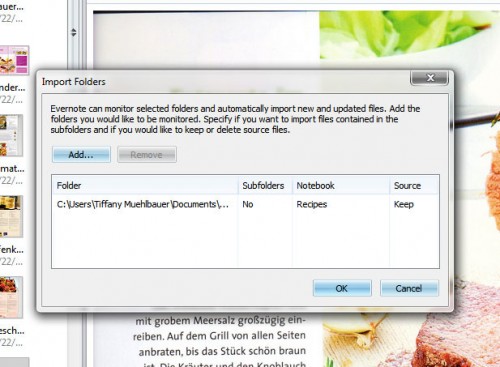
Now what you want to do is click on the “Add…” button and navigate to the folder where you are storing all your recipes (or projects or whatever it is you want to import into Evernote) and select it. Then you will tell Evernote what Notebook you want that information added to and if you want the files you are importing to be deleted when done.
This feature is so fantastic and works great. Although I have had the problem that Evernote is adding images while I’m scanning them (should likely close Evernote while scanning) and duplicates get added. This is not a huge deal because you can just through and delete them quickly, but it is a bit of a pain.
Evernote for Meal Planning
Something cool about Evernote is that you can actually link to specific “notes” within the program. This makes creating meal plans from your existing recipes super easy, because you don’t have to go through and search for them when you’re ready to cook them. Instead, you just click on a link in the meal plan note. To link to a note within Evernote, just right click on the note and select “Copy Note Link”. Or select the note in the preview screen, go to the Note menu and click Copy Note Link. Then you just paste it where you need it (Ctrl+V).
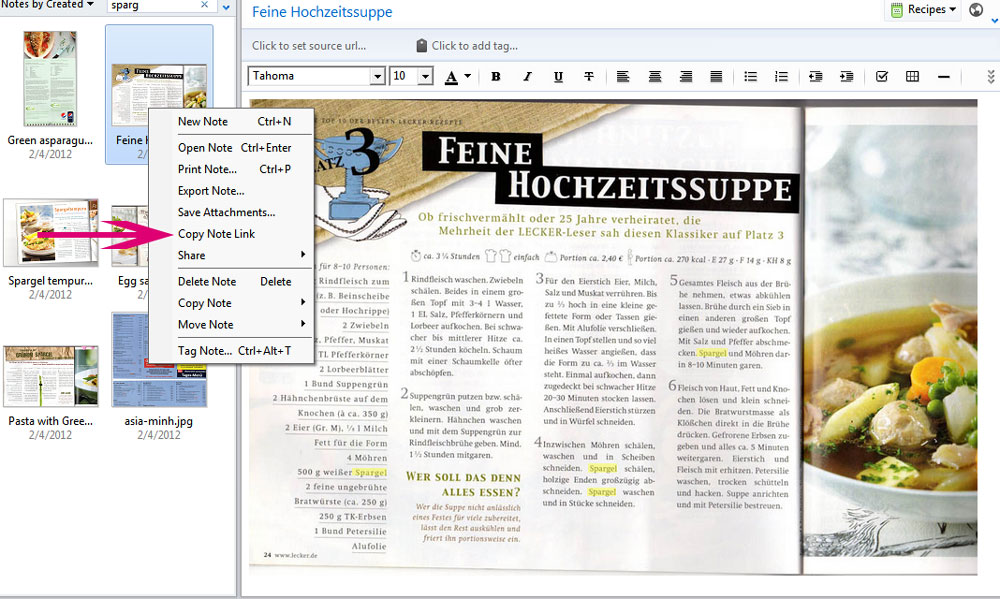
Of course you can also use put regular links to recipes in the plans. And on a side note, if you copy a recipe from the Internet, Evernote will add a like to the source page for you automatically…so you can always go back later and give credit to it in your blog, leave a comment or get more recipes.
How to Organize Recipes in Printed Cookbooks
The latest trick I’ve discovered for organizing recipes in Evernote makes use of their awesome text recognition feature in PDFs and images. I have quite a few cookbooks in our kitchen, but I rarely think to look at them when it comes to meal planning or just figuring out what to do for dinner on the fly. But then I realized that I can scan the recipe index and at least have a basic idea of what recipes are in those cookbooks — and therefore have a far greater chance of cooking from them! It takes Evernote longer to recognize the text within the images, but once it’s in there, it’s a truly incredible tool. You may notice in the image above that the word “Spargel” (German for asparagus but also used for white asparagus in English which is typically German) is highlighted over and over again. I pulled up that recipe using exactly this method, just searching for a word within the images to find what I wanted. Naturally, this all is a whole lot easier when you’re just adding things in a single language. But it recognizes text in many different languages. So if you’re multilingual, you can love Evernote that much more.
Hop over to Evernote.com to learn more and get started.
What sort of system do you use to organize your recipes? Do you feel like you’re missing out on using a lot of your recipes because they are closed up in books and magazines…or even packed in a box somewhere?


thank you, this is exactly what I need!
Glad you enjoyed it! I LOVE Evernote and think it’s just super useful for so many things…but since I put most of my recipes in there, I totally use them more often!
I am so new to Evernote that this was a great little tutorial on what all I can do with it. So far, all I’ve done is updated my project lists. I love that I can attach hyperlinks and pictures to my notes. My husband still has a flip phone, but if he ever converts to a smartphone, it will be because of Evernote. He’s so jealous!
Thanks for the recipe organization ideas!
The thing about Evernote is that you don’t want to over think it. It’s easy to add tons of tags and attributes to everything, but it’s really not necessary. Otherwise you get too much going on. I have one folder for all the recipes, each of our businesses and so on. Then I break things down a little from there (each client has a tag, for example) but the search feature is so powerful that you just don’t need to go overboard with it.
Hope you enjoy it! We’ve got all our house projects & decluttering stuff in there, plus a bunch of our daily things going on. It’s an essential part of our lives now 🙂
This is the second post I’ve seen about Evernote this week. Think the universe is trying to tell me something. And I’ve finally really got to learn to cook (have to go gluten-free), so I need to try something other than Pinterest to collect/organize. Thanks for the nudge.
I can totally see one of my daughters organizing all her recipes this way. It fits her orderly personality 100%. I am passing along the info.
You might also try BigOven, which is made for cooking and has a grocery list and menu planning calendar. Recipes you add to BigOven are scalable and include nutrition info too.
Thanks for the tip, Kate. I’ll check it out 🙂 Apparently MasterCook is also good for that sort of thing.
I am a major Evernote user and I rely on it for scanning recipes I come across online and in magazine. I love, love, love the cookbook index idea. I have over 100 cookbooks, so this will take some time, but it’s a brilliant idea. It would take the place of a tool like Eat Your Books. (Have you heard of it? I subscribed for a month but didn’t want to keep paying.)
I tried out Eat Your Books but I found that having to go to yet another website to get info was just not working for me. Plus the fact that they only offer the index there and not the recipes (which obviously they can’t offer the whole thing due to copyrights) kinda frustrated me. I also tried it out more than a year ago, when the service was brand new, and they didn’t have many of my cookbooks on there. So it was just too tedious for me.
So far, having the indexes in there is working well for me though. Definitely a little bit time consuming, but worth it so far 🙂
Oh my goodness you’ve just revolutionized my recipe system! Thank you thank you thank you!
I am really looking forward to trying all of this out! Have so far only
Been using Evernote for meeting notes but with a new iPad I’m
ready to have my recipes on it!
Love evernote. You could also check out Foodfolio…a simple tool for saving and organizing web recipes. You can use Foodfolio to add your own recipes, add from your favorite site, or add from people you follow. The new iPhone app is also good for keeping your recipes with you when cooking or shopping at the market. http://foodfolio.net
Hi there! Just stumbled upon your post, nice write up! I’m also a huge fan of Evernote, and have started to use it to organize my recipies. One great method I recently discovered is using the CamScanner app along with Evernote. You can take a photo of the recipe with your phone (using CamScanner), then you can crop directly in CamScanner which also enhances the image, then you can share directly to Evernote. (You can also use this for scanning any other paper files to Evernote.) I was shocked with how perfectly it recognized the text in my old newspaper clippings! Thanks again for the great post!! 🙂
OOooh, I’m going to have to try that! I just got a new android phone and I’m thoroughly enjoying all it has to offer. That app sounds really great! Would also be great for collecting receipts for business trips. And I love that it ties in with Evernote 🙂
I just tried this, and OMG!! It’s fabuous! Once I got the hang of it, it was a breeze. I just see all my paper receipe snippets disappearing. 🙂
Just an update for those who may stumble upon this old thread as I did. Evernote now has its own scanner app called Scannable on Apple iOS which makes this process even easier with native integration into Evernote. The Android app also has built in camera capture.
I love evernote and use it on my phone all the time, but the best tool I have found for recipes is Pasplore.com and I LOVE it!
Great tip, Amber! That site is very cool and there are some incredible sounding recipes in there! Thanks 🙂
Are you referring to the upgraded version? I don’t see the attributes you described.
I thought the folder sync was on the free version also – but I do have the paid version so perhaps it’s only part of the upgrade. Since I share a lot of files with my husband/business partner, the paid version is well worth the money.
Do you recommend having a hard copy of the recipe filed somewhere? What are the chances that I could lose my recipes on Evernote? Or is Evernote pretty reliable because it’s a cloud system?
If it’s something super special to you, you may want to keep a hard copy. But for the magazine scans and random recipes I find online, I’m not keeping any other copies.
It can be overly simple to delete files in Evernote because there is no “double check” feature, even with notebooks. But in my experience it has been extremely steady and reliable about holding onto the over 600 recipes I now have stored in there.
Wow, thank you! I had been struggling for years on how to organize and began using LivingCookbook. Slow as it was, and the fact they only have one programmer who is currently working on IOS and Android version (no telling when it will be ready)! I did lots of research and finally settled on BigOven and even upgraded to PRO. However, it is just one struggle after another in getting everything to sync (bigoven doesn’t like that word and actually scolds you in their help!). I love their IOS and Android app as the recipe is beautiful, but the windows version looks like crap!
I read this article regarding evernote and thought I would give this a go. I have been using evernote for over a year and have webclipped recipes, but have not used it as my main recipe box.
I typed a few recipes and copied over from bigoven to evernote easily and love the ease and speed.
I then scanned a recipe in Paperport and dragged it to evernote as a PDF document. I love it!!!! I really don’t need to go through 10,000 recipes and type each one out. I just need to scan what I have and organize.
When I was a teenager my mother and Granny bought me these awesome recipe packets called “My Great Recipes Packet”. I have not used them in 12 years because I wanted to preserve them and not have them get ruined. I am now scanning the complete collection so that I can start using them again.
Again, thanks for the article and I look forward to using Evernote as my main recipe box. I don’t have the folders to synch as I don’t want to use up my data. However, I can easily backup the recipe folders and restore them elsewhere.
I can also remote into my windows pc in my home office from my Ipad in the kitchen and pull up recipes that way, or I can easily go through the recipes and email them or transfer them to the Ipad.
Also, the IPad has what is called a “Bookshelf”. Folks, get your collection of most used favorite recipes together in a PDF document and you can add them to your bookshelf. This way, you can always pull up your favorite recipes!
And of course, synching evernote is another option, but there are additional fees with evernote if you do a lot each month!
So glad you found this solution useful, Toby. Now that I’ve had it in place for a few months, I truly adore it and wouldn’t want to try out anything else. You can have your recipes handy while shopping if you see something on sale or at the farmers’ market but aren’t quite sure what to do with it… and I also keep a quick shopping list in Evernote with my weekly meal plans (basically the days of the week with links to the notes of what I want to cook) which is super practical.
Since I use Evernote for business and personal uses, have the paid service anyway, which means I don’t worry too much about the syncing or size issues. To date, I’ve not gotten anywhere near reaching the limits with the paid version, but it’s definitely a real problem with the free one.
There there away to alphabetic your recipes in a folder on your andriod phone or on your Laptop. Like Desserts-cookies folders has Oatmeal Cookies, Lemon Cookies, Zucchini cookies, Chocolate chip Cookies. etc. too this>>>>> Chocolate chip Cookies,Lemon Cookies, Oatmeal Cookies, Zucchini cookies, I am add up to many recipes in one folder
Well one of the best things about evernote is being able to just search for things by name, tags or ingredients. But you can also sort the recipes (Notes) alphabetically by title in Evernote in each folder.
Perhaps you want to see about using some tags in your Evernote account to break down the categories more. Personally I have one big folder for all recipes, then I use tags to identify if they are desserts, sandwiches, etc. But if you have them in a dessert folder already, you can use the tags to just classify cookies, muffins, pies, etc.
On my andriod phone i install evernote food. there away to merge to the evernote to save the recipe on your Laptop too
Evernote Food should save automatically to your regular Evernote account, and then should sync up to all locations you include in your sync. Perhaps you weren’t seeing everything yet because things were still out of sync?
Hi Tiffany, I was doing a search for organizing recipes with evernote and came across this site and this wonderful post. I listened to the audio version of “Getting Things Done” and just recently found Evernote. It truly is amazing for organizing my documentation, receipts and such. I just had the thought of organizing my recipes on there especially since the cookbook software I have is kind of obsolete. Thanks!!!
Do you know if there is a way to have the scanned recipes appear in Evernote as an image rather than PDF or jpeg? The recipes I add by photo (with my phone) appear in the list as an image but the ones I’ve scanned and transferred are a closed PDF until I open the PDF. Does that make sense? I would prefer uniformity. Great post. Thanks for the helpful info!
Hi Deanna,
I’m going to try to answer this, assuming I understand exactly what is happening. 🙂
So, I’m guessing you’re on the free version and instead of the PDF embedding as a file that you can see and flip through, it’s just giving you the icon to click on? And you want it to look more like when an image embeds, right?
There’s a couple of things that could be causing it, but let’s hope it one of the simple things! 😉
First, go over to Options — > Note and look to see if the box next to “Always show PDF documents as attachments” is checked (it should not be).
Then, try to right-click on the PDF you have attached and see if it will let you select “View as Attachment” at the bottom of the list.
There’s a few more things that could help, but hopefully that will set it straight!
We are of the same mind. I use Evernote for everything and just posted on its web clipper to organize recipes. Life saver! http://cryingcook.blogspot.com/2013/01/organize-recipes-with-evernote-clipper.html
There is a simple yet powerful recipe manager that is free called foodforge.com It allows you to easily handle your recipes. I’ve tried many others.
I just came across your post when looking for recipe organization. I haven’t heard of Evernote before, but this sounds exactly what I am looking for. I just looked at their website, which product do you use? Evernote or Evernote for Food? Or is it all the same?
Hi Heather,
Evernote is the primary app. You can use Evernote Food for organizing recipes and there are some perks to that because it’s got new features that make it prettier to look through and easier to discover more new recipes (not like most of us need help finding new recipes, right? lol) but it still saves everything to your main Evernote account. So you will need Evernote first and then might want to play around with Food to see what process and interface you like best. I use Food to take notes about wines we try or new restaurants we visit — but I still save my recipes to a Recipes folder in Evernote. Hope this helps and do ask more if you have questions!
Wow! Yesterday I was staring at a pile of magazines and printed out recipes and I thought that perhaps Evernote might be a good way to organize and store them electronically (I haven’t really used Evernote much yet…). This post is vey helpful and convinced me that Evernote is the way to go!
Hi Tiffany,
So happy I found your Post about Evernote and its capabilities. Thank you for sharing.
Thanks Tiffany, your post us wonderful and very little has been written on this topic since so I found it really helpful. Loved the idea of having your recipe books index saved in Evernote so it was searchable too. One question, if I save a link to a recipe from a recipe site they tend to have advertisements for other recipes at the bottom and in doing a search the recipe might appear due to say the word chocolate being in an add at the end. Even though the actual recipe is not for say chocolate. Can I get around this? I’m a beginner so I might be asking something simple! Thanks.
Hi Sally! Glad you enjoyed the post and hope you love organizing your recipes (and other things too) in Evernote! 🙂
Have you ever used the Web Clipper extension/plugin for your browser? It “snips” directly to Evernote and has a feature to remove all the extra stuff from the page and only takes the core content. I think this would make it much easier for you.
Hi Tiffayy,
I really found this post very useful. But I have a question. You mentioned that it is possible to import a whole folder from my computer into Evernote by doing:
Tools –> Import Folders…
But I’m using Evernote for Mac and I don’t see ‘tools’ or ‘import folders’. could you please tell me where to find it? If you’re not using Evernot for Mac, could you please tell me if it’s possible to import a whole folder from my computer using Evernote website platform?
Thank you very much,
Bio
Believe it or not, there does not seem to be an easy explanation for why there is no import option for folders in Evernote. But I did see that some people are using AppleScripts to set up a work around. Here’s one such solution: http://veritrope.com/evernote-desktop-folder/
Hope you find something that will work great!
ah, ok, I had understood from your post that there is a an easy import option for folders in Evernote, but I guess I didn’t understand correctly. Thanks for the suggestion about the applescripts. I’ll check it out.
Please make a video on this. That’ll really help grasp it quickly.